




Modern enterprises are not short on data. They are short on clarity.
Product teams track hundreds of behavioral events. Marketing teams monitor campaign performance across channels. CX teams analyze engagement and retention. Dashboards are full. Reports are automated. Metrics are reviewed weekly.
Yet one deceptively simple question continues to slow down decision-making across organizations:
How is user behavior actually evolving over time — and what is driving that change?
Is that uptick in product views organic growth, or a campaign spike that’ll vanish next week? Is feature adoption building into a habit, or was it temporary curiosity? Is conversion holding steady because performance is healthy — or because one high-value segment is quietly compensating for churn elsewhere?
These questions usually send analysts hunting through exports, reconciling numbers across disconnected tools, or waiting on custom pulls. Time-series clarity has been, for most teams, a gap rather than a given.
Today, we’re introducing Trend Analytics (Trends): a powerful, event-centric time-series analytics capability designed to give enterprises a clear, flexible, and scalable view of how user behavior evolves.
Why Time-Series Intelligence Is the Missing Layer in Enterprise Analytics
Most analytics modules are optimized for specific questions.
Funnels show conversion paths.
RFM shows customer value.
Campaign reports show channel performance.
Each of these is essential. But none of them answer the foundational growth question:
Is behavior improving, declining, or structurally shifting over time?
Growth is not a snapshot metric. It is a trajectory.
Without a dedicated, flexible time-series explorer, teams struggle to:
- Detect slow declines before they become revenue-impacting.
- Validate whether product releases drive sustained engagement.
- Understand which segments are accelerating and which are plateauing.
- Correlate behavioral patterns with business outcomes.
In high-volume environments, this becomes even more complex. Enterprise teams need performance, transparency, and scale — without sampling ambiguity or hidden cutoffs.
Trend Analytics was built to solve this problem natively within Netcore Cloud.
What Is Trend Analytics?
Trend Analytics is a unified time-series behavioral analysis module that allows you to visualize how events evolve over time across audiences, attributes, and segments — all within a combined graph and tabular interface.
It is designed for teams that need both strategic clarity and operational precision.
With Trend Analytics, you can:
- Track multiple events in parallel and understand how they move relative to each other.
- Measure activity by total volume, unique users, engagement intensity, or aggregated metrics such as revenue.
- Break down trends by product category, geography, platform, device, technographics, or predictive attributes.
- Move seamlessly from macro-level patterns to granular, ranked insights.
The result is not another dashboard. It is a structured, scalable way to analyze behavioral direction.
A Practical Framework: How Trend Analytics Works
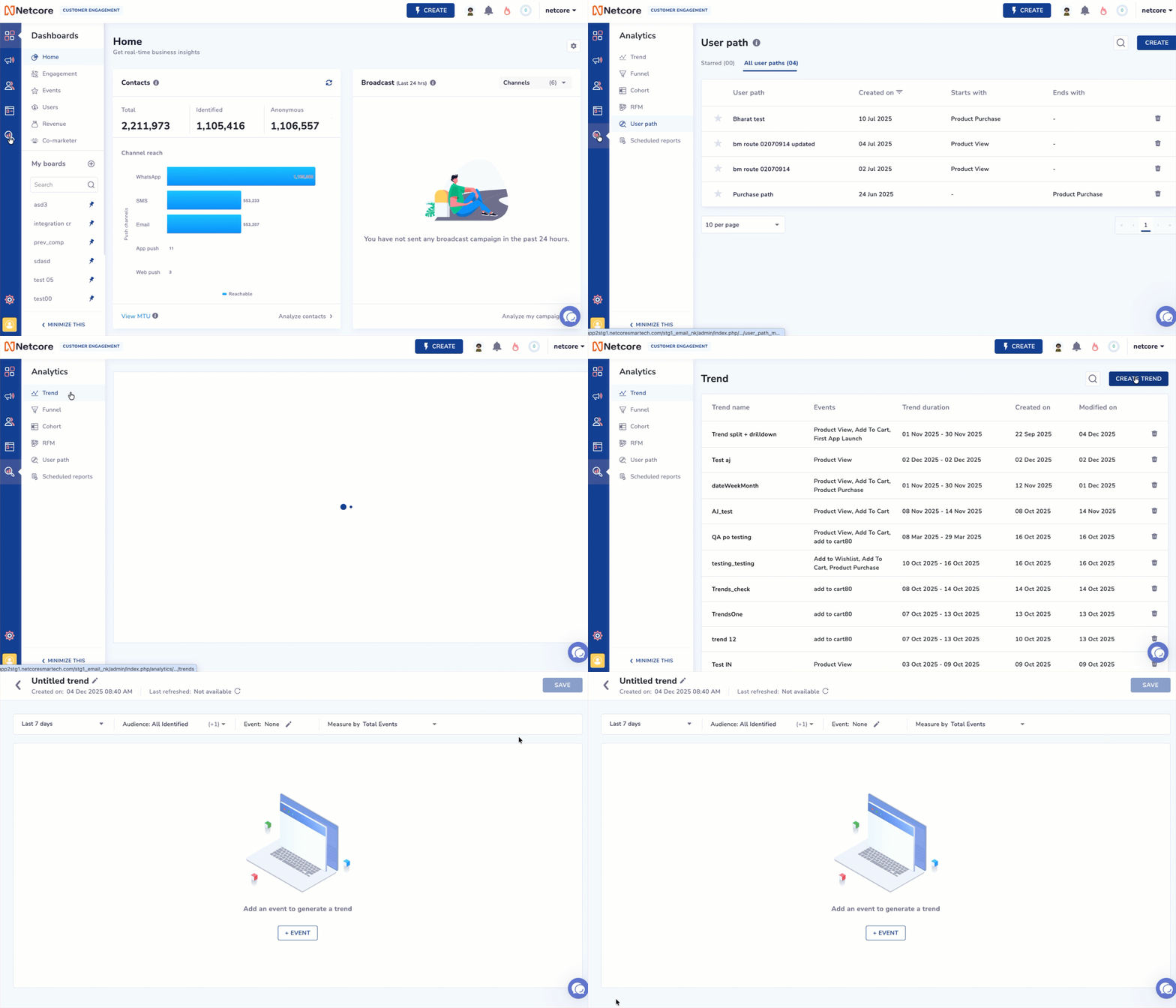
(Netcore Trend Analytics interface showing how to create a new trend view by selecting time range, audience, event, and measurement type for time-series user behavior analysis.)
Trend Analytics is built around a simple but powerful workflow.
1. Define the Time Horizon and Audience
Select the timeframe that aligns with your strategic question — from daily views to multi-month analyses.
Then define the audience:
- All users
- Identified users
- Specific lists
- Saved segments such as high-value customers, loyal buyers, or high-propensity users
This ensures that the trend you analyze is contextually relevant.
2. Select Events and Define Measurement Logic
Add up to five events to analyze simultaneously. For example:
- Product Viewed
- Add to Cart
- Purchase
- Loan Application Started
- Feature Viewed
Choose how you want to measure them:
- Total Events for overall activity volume
- Unique Users for adoption and reach
- Events per User for depth of engagement
- Aggregations for numeric payloads such as revenue, session duration, or order value
This flexibility allows teams to move beyond counting clicks and toward understanding behavioral intensity.
3. Break Down and Compare Performance
Behavior rarely shifts uniformly across your user base.
Trend Analytics enables:
- Split By analysis across attributes like category, city, platform, or campaign.
- Drilldown views across device, OS, affinity, or predictive propensity.
The visualization highlights directional movement.
The table provides ranked precision, exact counts, and sortable insights.
Together, they transform trends from abstract curves into actionable intelligence.
Industry-Specific Applications: How Enterprises Use Trend Analytics
Let’s look at how this translates into real-world impact.
Ecommerce & Retail: Diagnosing Category-Level Conversion Drift
An enterprise ecommerce brand observes stable overall revenue over a quarter. However, growth has slowed compared to projections.
Instead of reviewing aggregate metrics, the analytics team uses Trend Analytics to plot:
- Product View
- Add to Cart
- Purchase
They split the trend by product category and drill down by platform.
The insight is immediate:
- Views for a high-margin category are increasing.
- Add to Cart activity is stagnant.
- Purchases are declining specifically on Android devices.
Further investigation reveals that a recent app update introduced latency in the checkout flow for that category.
Because the team identified the trend shift early, they corrected the issue before it materially impacted quarterly revenue.
Without a dedicated time-series breakdown, this category-level erosion would have remained hidden behind stable topline numbers.
BFSI: Uncovering Structural Approval Bottlenecks
A financial services organization launches a large-scale digital campaign for personal loans. Click-through rates and application starts increase significantly.
However, approval volumes remain flat.
Using Trend Analytics, the team tracks:
- Loan Page Viewed
- Loan Application Started
- Loan Submitted
- Loan Approved
They measure by Unique Users and split by geography.
The data reveals a critical insight:
Applications are increasing in Tier-2 cities, but approval rates in those same cities are trending downward.
Drilldown analysis shows that a newly introduced documentation requirement is disproportionately affecting users in lower-bandwidth regions.
The issue is operational, not marketing-related.
By simplifying the documentation process, the institution restores approval rates and improves customer experience.
Trend Analytics transformed what appeared to be a marketing-performance issue into a product and process optimization opportunity.
App-First Digital Brand: Measuring Real Feature Adoption
A subscription-based streaming platform launches a personalized recommendation engine. Initial engagement looks promising.
Leadership asks a more strategic question:
Is the feature driving sustained engagement, or just early curiosity?
Using Trend Analytics, the team analyzes:
- Feature Viewed
- Content Played
- Session Duration
They measure Events per User and compare high-propensity users against the broader base.
The results show that:
- Power users significantly increase session duration.
- Casual users show minimal behavioral change.
This insight informs a targeted onboarding initiative for casual users, introducing contextual prompts and guided recommendations.
Over the next month, engagement trends shift upward across segments.
The feature was effective — but only after adoption friction was addressed.
Trend Analytics provided the visibility needed to optimize rollout impact.
Designed for Enterprise-Scale Data Environments
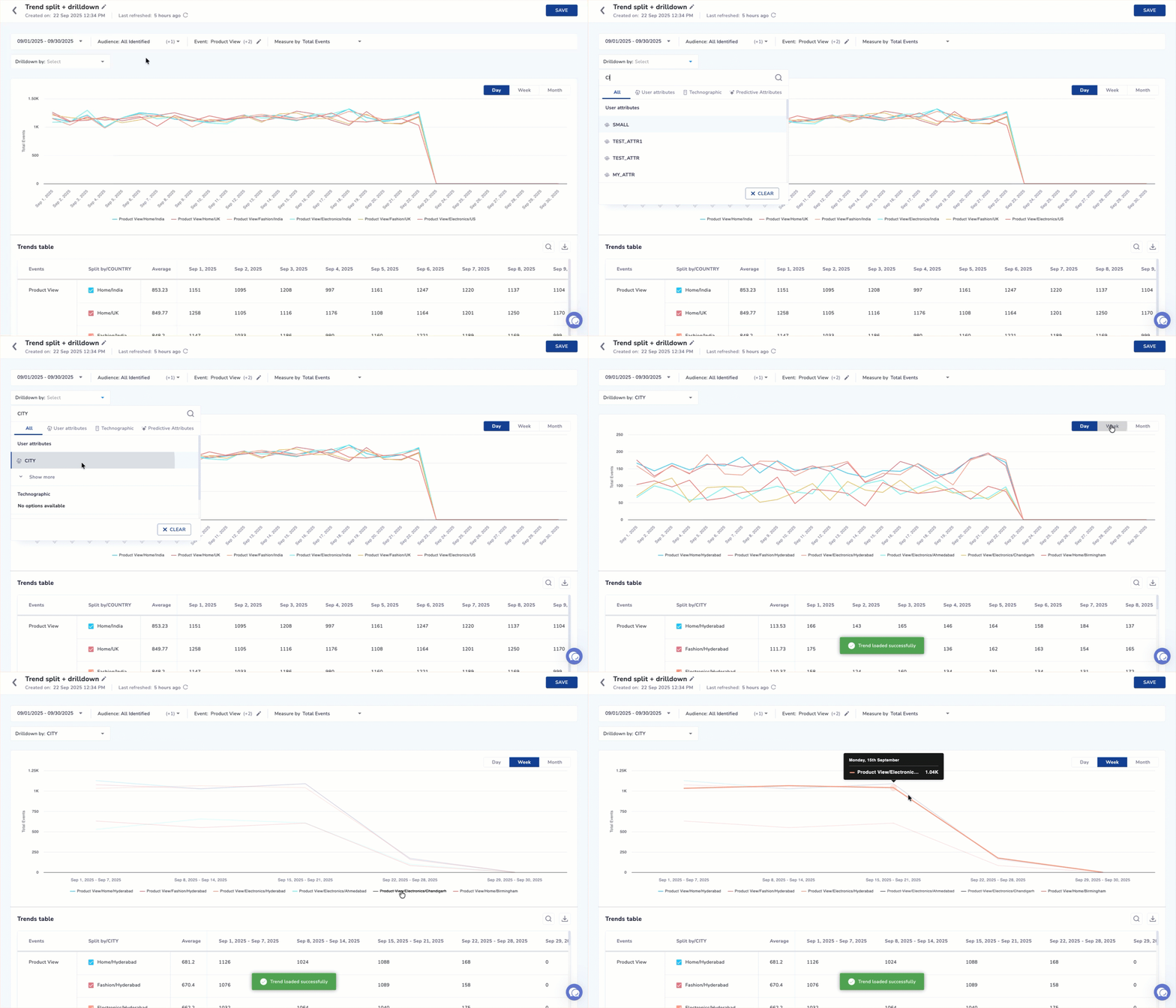
(Trend Analytics dashboard displaying product view events split by city, with daily time-series graph and detailed trends table for behavioral analysis.)
Enterprise customers require transparency and performance.
Trend Analytics is built with:
- Explicit row budgeting to ensure predictable performance.
- Clear Top-N logic so users understand exactly what they are viewing.
- Transparent handling of “Others” and “Not Set” values to eliminate ambiguity.
- Native integration with Netcore’s event schema and audience framework.
This means your analysis is consistent across:
- Events
- RFM segmentation
- Cohorts
- Funnels
- Campaign performance
You are not stitching together disconnected insights. You are working within a unified behavioral ecosystem.
The Strategic Impact
When organizations gain clarity on behavioral direction, three things change:
- Decision speed increases: Teams no longer wait for custom analysis to validate hypotheses.
- Cross-functional alignment improves: Product, Marketing, and CX operate from a shared time-series view.
Execution becomes proactive: Early signals of decline are identified before they impact revenue or retention.
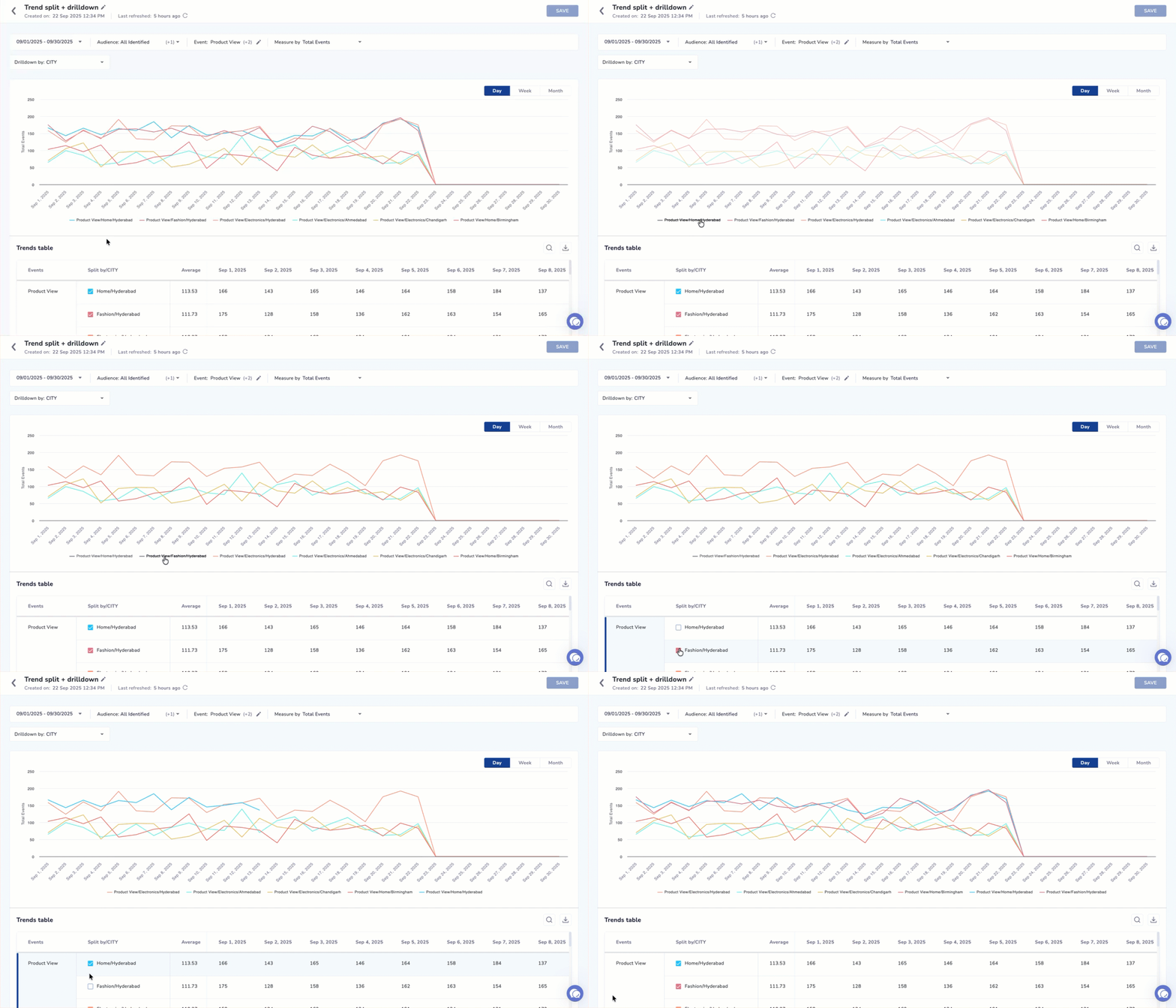
(Trend Analytics split by country showing time-series product view events across India, UK, and US with drilldown comparison in graph and table format.)
Trend Analytics is not simply about charting event counts.
It is about understanding momentum.
- Are your users deepening engagement?
- Are specific segments accelerating faster than others?
- Are new releases creating structural change or temporary noise?
These are strategic questions. They require a strategic analytics layer.
Move From Reporting to Direction
In enterprise environments, clarity is a competitive advantage.
Organizations that can detect behavioral shifts early iterate faster.
Organizations that understand segment-level momentum allocate budgets more intelligently. Organizations that operate on directional data, not snapshots, compound growth.
Trend Analytics equips you with that capability.
If your teams are tracking events but struggling to interpret direction, it is time to evolve your analytics stack from static reporting to time-series intelligence.
Create your first Trend view inside Netcore Cloud and begin analyzing behavioral momentum with confidence.
Because growth is not about what happened yesterday.
It is about where you are heading next.