




You assume users move neatly from signup to purchase. In reality, they loop, stall, and drop off in places you never planned for. Funnels show you drop-offs, not detours. Cohorts show you retention, not journeys. But your revenue feels every missed step.
That’s where User Paths come in. Netcore’s User Paths give you a clear, visual map of how customers actually move—so you can spot friction, uncover missed opportunities, and act before drop-offs cost you.
Where today’s user path analysis falls short
Most tools stop at partial visibility—you can define where a journey starts or ends, but not both. That means you miss the story in between—the middle moments where most users loop, stall, or drop off. You don’t get to deep dive into sections between specific points in the user paths.
Netcore User Paths: From blindspots to clarity
We built User Paths to show you the real journeys, with the flexibility to focus only on what matters. You get:
- Custom windows: Analyze journeys inside a defined lookback (days, hours, even minutes).
- Exclusions: Remove noisy events (like homepage visits) to keep the analysis clean.
- Include/exclude repeat events: See every repeat action, or strip them out for a simpler view.
- Start + end points: Anchor your view to specific events, or define both to track goal-driven flows.
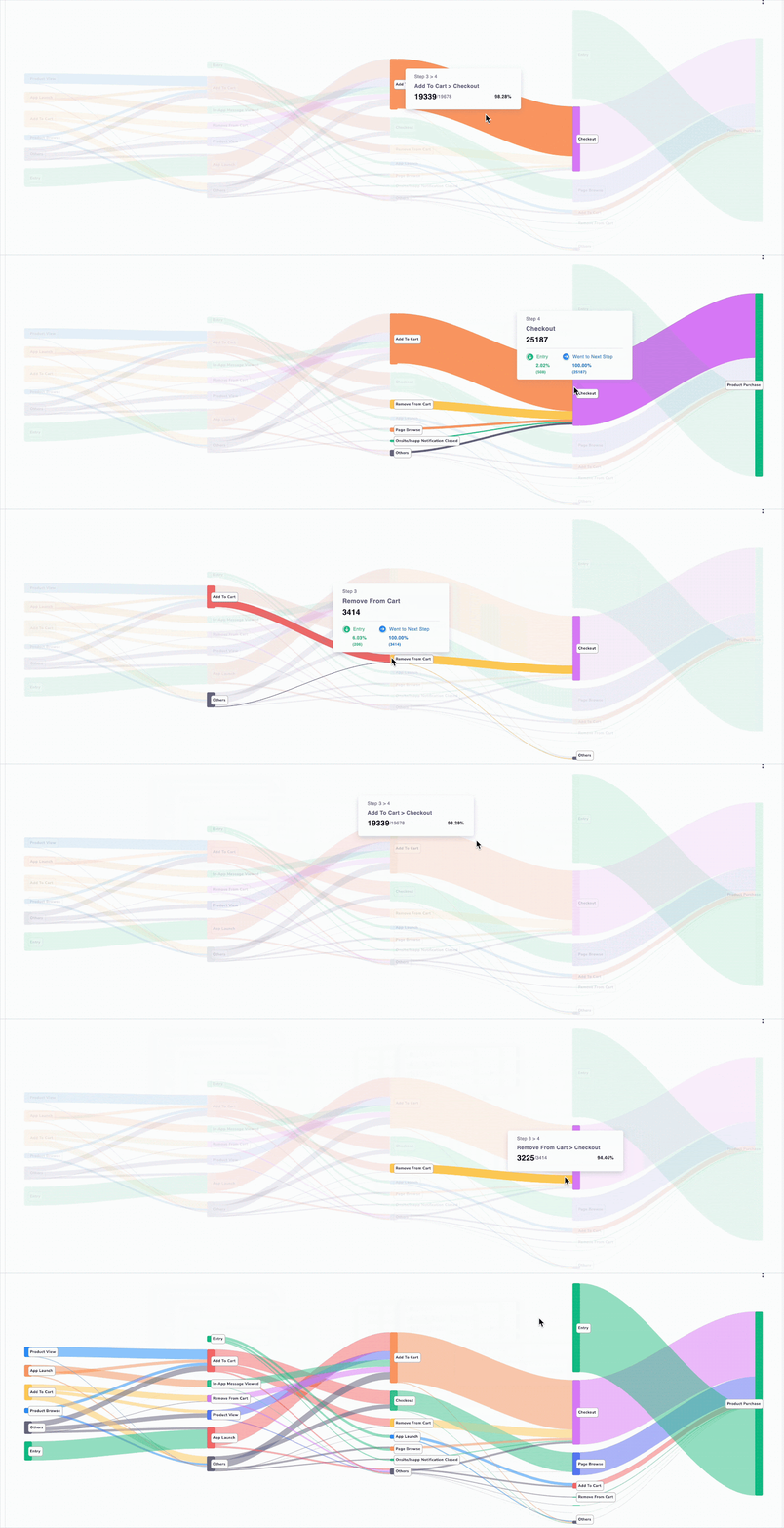
With Netcore, User Paths aren’t just a map. They’re a decision-making tool. Let’s see how.
See where users stall—and why they don’t move forward
Users rarely move in straight lines. They explore, retry, and often drop at the same step. With Path windows and exclusions, you can see exactly where they get stuck.
👉 Example: An ecommerce brand assumed pricing was the problem. But when they mapped paths, they found drop-offs happening at the payment page during checkouts. That single insight changed their approach and recovered sales.
Focus on the journeys that drive results
By defining both start and end points, you can isolate only the paths that matter. This enables you to focus on specific sections of the user journey.
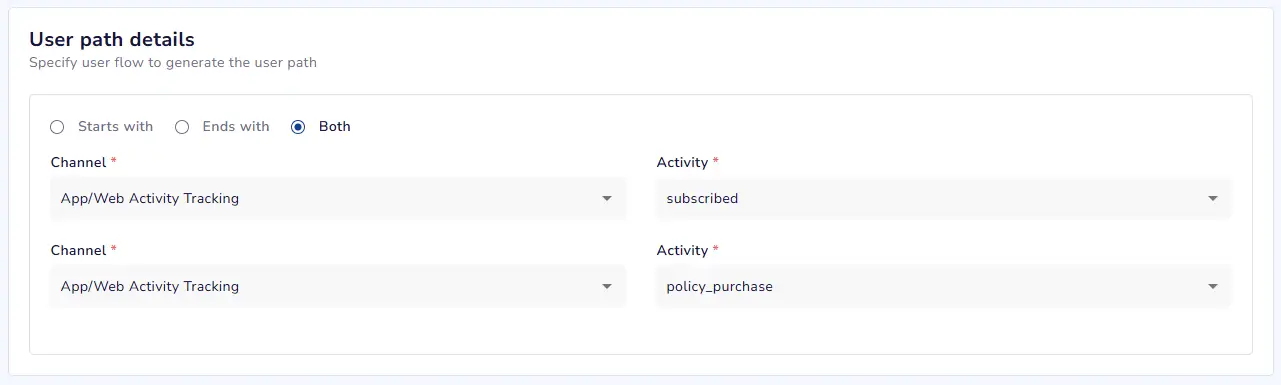
For example,
- A BFSI brand sets Start = Fund Add and End = Payment Complete. They find half the users loop back to “view terms” multiple times before dropping off. With in-app nudges explaining terms upfront, completion rates rise.
- An ecommerce app sets Start = Product Search and End = Product View to measure search effectiveness. They discover 40% of searches don’t lead to any product view, signaling a poor search experience.
Remove noise to reveal real friction
Sometimes you don’t want the noise of generic events. With exclusions, you can strip those out and keep the chart sharp.
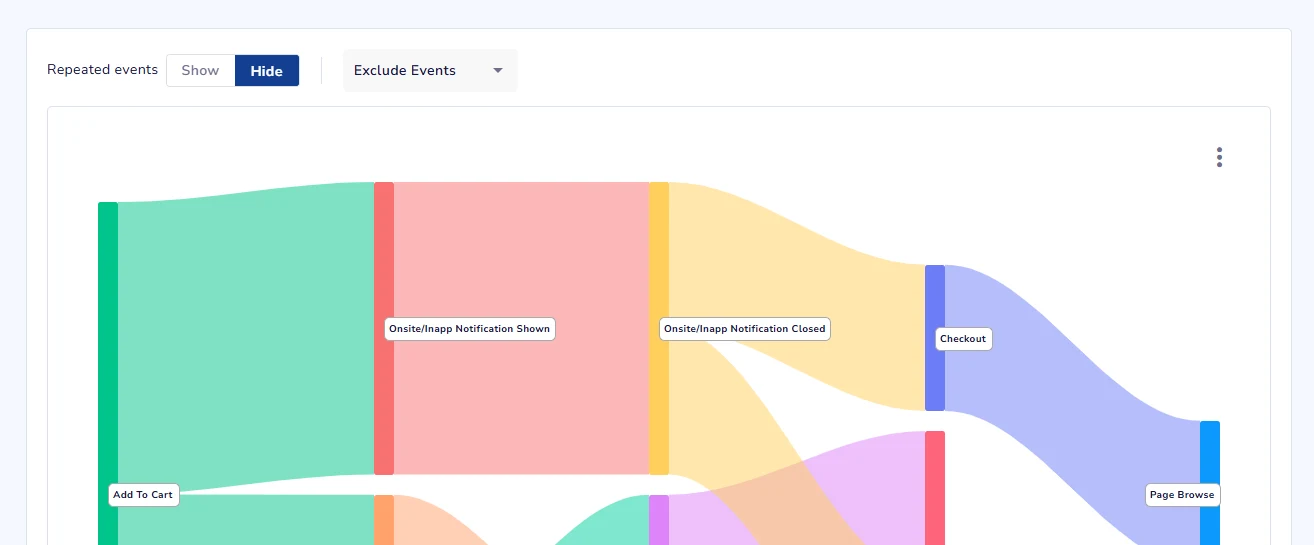
For example, an edtech platform excludes “homepage visited” and “course browsed” to see the true journey from Signup → Course Enrolled → Course Completed. The cleaned-up path highlights where most learners stall, so they can add tutor nudges at the right step.
Toggle between every click—or the clean summary
Some actions matter more the second, third, or tenth time a user tries. With the Repeat events show/hide toggle, you decide to:
- Hide repeat events for a clean, simplified view.
- Show repeat events to see hesitation, retries, or obsession.
For example, a FinTech app includes all product views. They find users revisit the same “Gold Investment” page multiple times before purchasing. That signals hesitation—so they trigger advisor chats to speed up decisions.
Unlocking use cases with User Paths for better conversions
E-commerce
- Cart abandonment isn’t just about checkout—it’s about friction hiding earlier in the journey. With User Paths, ecommerce teams can visualize how shoppers really move through the funnel: from Product View → Add to Cart → Checkout → Payment.
- If most users drop off right after “Add to Cart,” that’s your signal to test faster payment flows or dive even deeper to find the root cause. You can also compare search-to-view paths across categories like Activewear vs Formalwear to uncover which categories or search results drive engagement and which need optimization.
FinTech
- In financial journeys, every extra step creates hesitation and hesitation kills conversions. User Paths help identify where users pause or loop in flows like KYC verification → Add Funds → Payment Complete. For example, if users repeatedly revisit “View Terms & Conditions” before dropping off, that friction can be resolved by simplifying disclosures or embedding guided FAQs.
- You can even compare journeys for different product types—mutual funds vs fixed deposits—to see which flows need advisor intervention or trust cues.
Travel & Hospitality
Booking journeys are rarely linear. A user might browse packages, check fares, revisit dates, and drop off without booking. User Paths show you exactly where travelers abandon the journey—whether after fare search, at payment retry, or while comparing options. By visualizing these behaviors, you can trigger contextual nudges like “fare change alerts,” “payment reminders,” or personalized package offers to recover lost bookings. Over time, analyzing returning travelers’ paths (domestic vs international) helps you craft loyalty journeys that match their real booking cadence.
Media & Subscriptions
Trial users are often your most promising customers—but they churn silently. With User Paths, you can track the flow from Free Trial → Binge Viewing → Subscription Upgrade. See where users loop without converting—like repeatedly visiting “Upgrade” but not completing payment. These insights help you trigger timely nudges such as “Continue Watching” emails, “Upgrade to skip ads” banners, or trial extension offers that turn engagement into revenue.
The Netcore difference
Netcore Cloud shows you start + end points together → Goal-driven analysis (exclusive to Netcore).
Conclusion
User Paths with Netcore let you see the real journeys customers take—not the ones you assume. With flexible windows, exclusions, and goal-driven views, you’ll know exactly where users stall, loop, or convert.
And because paths connect directly to action, you can fix friction, optimize flows, and grow conversions—all in the same workflow.
Already a customer? Contact your CSM to use User Paths. New here? See User Paths in action—book a demo.