




Most personalization conversations in CRM start in the wrong place. Teams spend energy on segmentation — building audience buckets, tagging users by tier or behavior, writing a separate message for each group. It works, to a point. But segments are defined by what was true about a user at a specific moment in time. The message that goes out reflects that moment, not the moment the user actually opens it.
The result is campaigns that are personalized in structure but static in execution:
- A Gold-tier member gets the Gold message — even if they’re 48 hours from a subscription lapse
- A Silver-tier member gets the Silver message — even if they just crossed a points threshold this morning
- Everyone else gets the default — even if their context has changed significantly since segmentation
Liquid Tags change this by moving the logic inside the message itself.
From Segments to Conditional Logic
A segment answers the question: who should receive this campaign? Liquid Tags answer a different question: what should each person actually see?
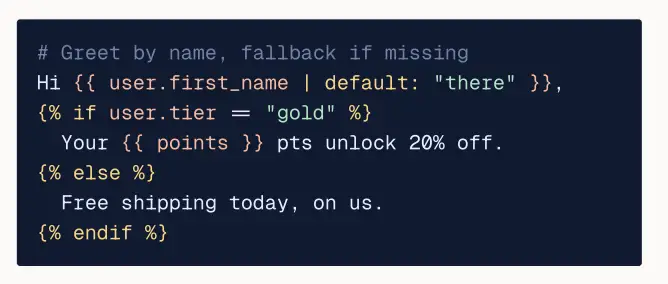
They’re a templating layer built directly into the campaign editor. Before a message is sent to any individual recipient, Liquid evaluates conditions against that recipient’s live profile data and assembles the appropriate version on the fly. The marketer defines one template with branching logic — not one message per audience.
Liquid is a templating language originally developed by Shopify and now the de facto standard for personalization in modern marketing platforms, the same language used
by Braze, CleverTap, and the broader ecosystem.
The simplest form: if a user’s loyalty tier is Gold, show an early-access banner. If Silver, show a points nudge. For everyone else, show the standard offer. One template, three meaningfully different experiences no separate campaigns to build, schedule, or track.
What Liquid Tags Actually Let You Do
Conditionals
The if/elsif/else structure lets you gate entire content blocks behind data conditions. Some examples of what this unlocks:
- Show a renewal reminder only to users whose subscription expires in the next 7 days
- Surface a location-specific promotion only when a user’s city matches an active market
- Hide a referral CTA from users who have already referred 3 or more friends
- Show a “back in stock” alert only to users who previously viewed that product
Conditions can be stacked, nested, and combined with and / or operators — giving marketers precise control over what each recipient sees without writing code from scratch.
Filters and Transformations
Data stored in your systems rarely arrives in message-ready format. Liquid’s 47 built-in filters close that gap automatically:
| Filter Type | What It Does | Example |
| String | Capitalizes, trims, truncates text | “sarah” → “Sarah” |
| Math | Rounds, multiplies, formats numbers | 1299.9 → $1,299.90 |
| Date | Localizes and formats timestamps | Unix timestamp → “June 12, 2025” |
Data arrives raw from your APIs. Liquid makes it presentable — no pre-processing step required.
Loops
Loops let you iterate through arrays of data and render each item using a consistent layout block. This unlocks list-based content that scales dynamically:
- Abandoned cart emails — render every item in the cart without hard-coding the number of products
- Browse history recommendations — surface the user’s top 3 (or top 5, or top N) viewed items automatically
- Ranked product feeds — pull a recommendation list and display it in order, regardless of list length
Add a product, remove one, reorder the array — the template adapts without any edits on the marketer’s end.
How This Compares to Other Platforms
Real-time personalization isn’t unique to our platform — but the authoring experience and reliability infrastructure around it are.
| Netcore | Braze | MoEngage | Clevertap | |
| Templating Language | Liquid | Liquid | Jinja | Liquid |
| Send-time External API Fetch | Content Fetch | Connected Content | Content APIs | Linked Content |
| Authoring UX | Co-Marketer | Manual code | No-code UI builder | Manual Code |
| Advanced Personalization + Fetch | Content Fetch (native) | Available | Available | Available on Advanced Plan only |
| Failover Handling | Forced fallbacks + NFR guardrails | Author-defined sarah: filter | Author-defined sarah: filter | Not specified |
Liquid Tags work across every Netcore channel: Email, Push, SMS, WhatsApp, RCS, In-App, and Web with consistent syntax and behavior, so the template you author once runs anywhere you send.
Other platforms that use Liquid still require marketers to write and validate it manually. Platforms with no-code builders abstract the syntax, but sacrifice the flexibility of conditional logic. Our implementation combines the expressiveness of Liquid with an AI authoring layer that makes it accessible to any marketer and backs it with reliability infrastructure that makes it safe to run on business-critical sends.
The Authoring Problem (and How We Solved It)
Liquid is powerful. It also has a learning curve. For marketers who aren’t comfortable with code syntax, the historical options have all involved tradeoffs:
- Basic merge tags only — easy to use, but capped at first-name-style personalization. No conditionals, no loops, no real logic.
- Engineering or specialist resources — full Liquid expressiveness, but every conditional change becomes a ticket. Slow, expensive, and a bottleneck on campaign velocity.
- No-code conditional UI builders — accessible to any marketer, but the abstraction caps what’s possible. Nested logic, advanced filters, and custom transformations either aren’t supported or require dropping back into code anyway. The skill you build doesn’t transfer outside that platform.
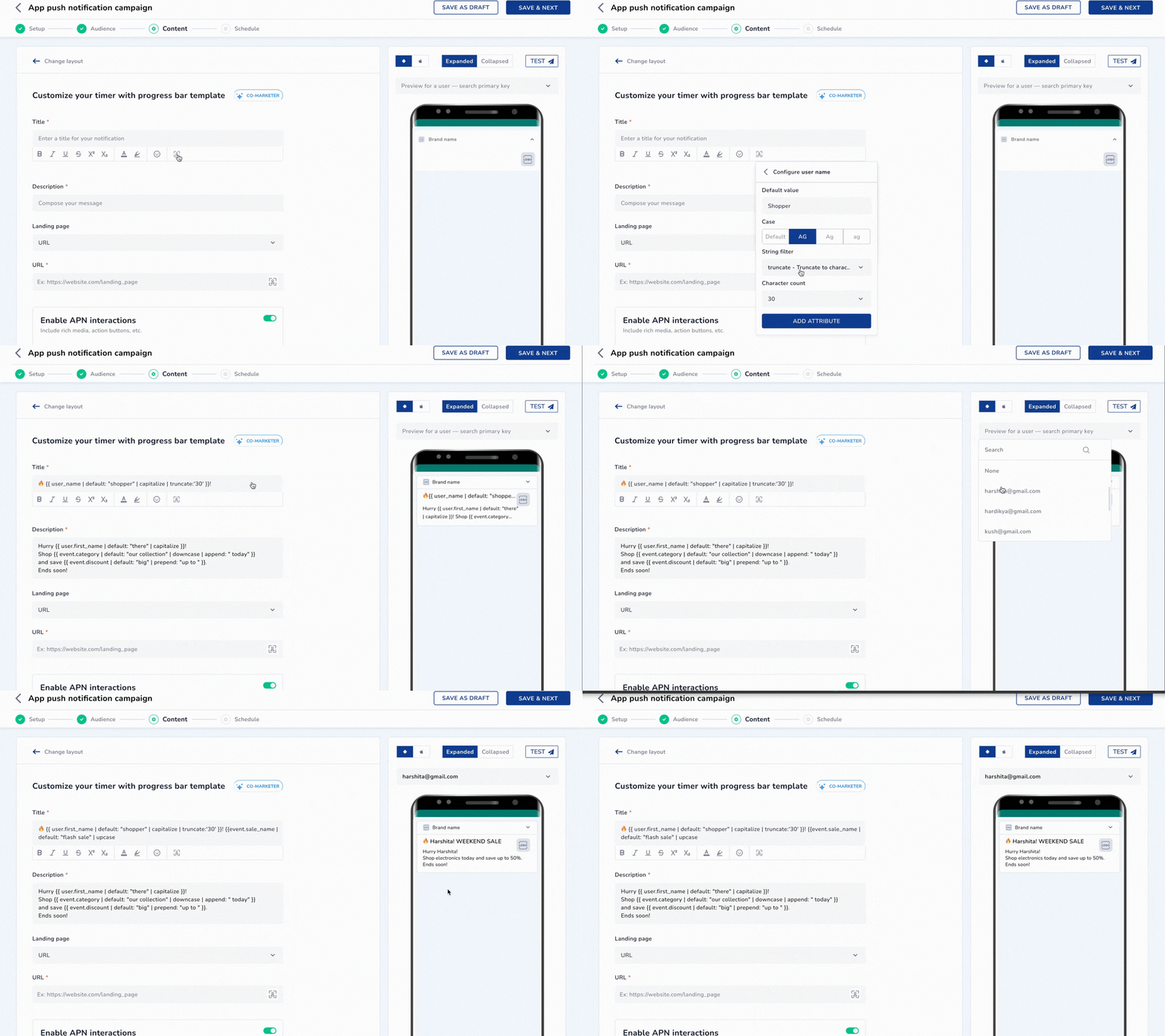
Co-Marketer takes a different path: keep the full expressiveness of Liquid, but generate it from natural language.
- Describe your intent in plain language — e.g. “Show a renewal reminder if the subscription expires in less than 7 days, otherwise show the standard message”
- Co-Marketer generates the validated Liquid snippet — syntactically correct, with the right variable references
- Review and drop it into your template — ready for production, no edits needed
The output is real, inspectable Liquid code. That means three things that no-code builders can’t offer: nothing is hidden behind an abstraction layer, the logic is portable as your stack evolves, and the marketer’s mental model maps directly to what’s running in production.
Co-Marketer also enforces two properties that protect campaigns at scale:
- Forced fallbacks — before generating any conditional, Co-Marketer requires the author to define what happens when the expected data is missing. A message that renders an empty loyalty balance looks worse than no personalization at all.
- PII safety by default — Co-Marketer references attributes by schema, not by value. It never reads or returns the actual contents of user records during authoring, keeping compliance guardrails intact as personalization complexity scales.
A Note on Data Quality
Liquid Tags are a logic layer, not a data layer. The output is only as good as the attributes being evaluated. Before building complex conditional logic, it’s worth a quick audit:
- Are the attributes you want to personalize against current in your platform?
- Are loyalty tier updates happening in real time, or on a daily batch job?
- Are behavioral attributes refreshed frequently enough to be meaningful at send time?
If the answer is “not current enough” — the higher-impact fix is getting that data to resolve at send time. That’s where Content Fetch comes in. It pairs directly with Liquid Tags as the data layer beneath the logic layer.
For attributes that are already accurate and live in your user profiles, Liquid Tags are ready to go today.
Where to Start
The highest-impact, lowest-complexity entry point for most teams:
- Start with a tier-based conditional — different content for different loyalty or subscription levels, within a single campaign
- Add filters — make sure names, prices, and dates are rendering cleanly
- Build a loop block — replace a static 3-product recommendation section with a dynamic, data-driven equivalent
Each step is independently valuable and builds toward a template that can produce a unique, accurate message for every recipient — without any increase in campaign management overhead.
Personalization That Lives in the Logic, Not the Segment
Segment-based personalization had its moment. But when the logic lives outside the message, you’re always one batch sync away from sending the wrong content to the right person.
Liquid Tags move that logic inside the template — where it belongs. Conditionals that evaluate live profile data, filters that make raw attributes message-ready, and loops that render dynamic content regardless of list length. All of it authored in plain English through Co-Marketer, and all of it running in production without a line of manual code.
The result isn’t just more personalized campaigns. It’s fewer campaigns to build, fewer variants to manage, and fewer moments where a message arrives reflecting a reality that no longer exists.
If you’re still building one campaign per audience segment, Liquid Tags are the faster, more scalable alternative — and the starting point is simpler than it looks.