





For e-commerce marketing teams, the year isn’t really measured in standard fiscal quarters. It is measured in two distinct, high-adrenaline phases: preparing for Black Friday/Cyber Monday (BFCM), and surviving the event itself.
Right now, BFCM might feel like a distant milestone. Your immediate focus is likely on navigating the summer slump, finalizing Q3 product launches, or squeezing the last bit of ROI out of your mid-year clearance sales. But if you are quietly frustrated with your current customer retention platform, if you are battling slow load times, inexplicable drops in deliverability, or clunky workarounds just to launch a basic campaign, the most critical deadline of your year isn’t in late November.
It is right now.
Migrating to a new marketing automation platform is a major strategic decision. Doing it properly requires a precise, non-negotiable timeline. If you wait until late September to start looking for alternatives, you will be trapped with your current, underperforming vendor during the most high-stakes revenue weeks of the entire year.
Here is a deep dive into why the window for a marketing automation migration is rapidly closing, how to evaluate a true enterprise-grade platform, and why the migration process is the biggest opportunity you have to clean house and supercharge your BFCM prep.
The Calendar Doesn’t Lie:
In the e-commerce tech ecosystem, October is universally recognized as the beginning of the “code freeze.” By early October, your website infrastructure, your API integrations, and your core marketing automation workflows need to be absolutely locked in. Peak season is not the time to be testing new data syncs, updating SDKs, or troubleshooting a broken abandoned cart flow.
If your marketing stack needs to be frozen and fully operational by October 1st, we need to work the timeline backward. A safe, stress-free enterprise migration takes 6 to 12 weeks. Note that these phases run in parallel, not sequentially—the timelines below overlap rather than stack end-to-end. Here is exactly why:
- The Warm-Up Window (4 to 6 weeks): This is the most critical phase. Your new dedicated IP addresses and sending domains require a gradual, highly monitored warm-up period. You have to slowly build a strong sender reputation with inbox providers like Gmail, Yahoo, and Apple. If you rush this process to beat a holiday deadline, you will trip spam filters, and your BFCM campaigns will land in the junk folder.
- Data Migration & Rebuilding (3 to 5 weeks): This involves safely exporting years of historical data, mapping custom attributes, rebuilding your core revenue-generating flows natively in the new platform, and rigorously QA testing every single branch of logic.
- Vendor Selection & Procurement (2 to 4 weeks): Don’t forget the time it takes to actually evaluate platforms, run security and compliance reviews, negotiate terms, and sign contracts.
When you do the math, to hit an October code freeze with your core automations live, tested, and your IP reputation glowing, your vendor evaluation needs to be wrapping up by late July or early August.
The Tipping Point: Signs You Need a Marketing Automation Migration
There is a common psychological trap among CRM leads and email marketers: “My current platform isn’t great, but it’s the devil I know. Moving is too risky.” Tolerating sub-par technology is exhausting, but the idea of ripping it out feels terrifying. However, if your current technology is actively creating friction, the real risk is entering your peak season severely handicapped.
Ask yourself these honest questions about your day-to-day marketing operations. If you are nodding along, you are losing revenue:
1. The Frankenstein Tech Stack
Are you juggling five different tools just to execute one omnichannel campaign? Many platforms claim to be “omnichannel,” but what they really mean is they do email, and they recently bolted on a rudimentary SMS feature. If you have to export a CSV of users from your email platform, upload it into a separate SMS tool, and use a third tool for push notifications, you don’t have an omnichannel strategy. You have a massive data synchronization delay waiting to happen. True omnichannel means Email, SMS, WhatsApp, Web Push, and In-App messages are orchestrated from a single dashboard with a unified customer view. Pay particular attention to the in-app and mobile app layer. SMS is table stakes, most enterprise stacks already have an integrated approach there—but app messaging is where most platforms quietly fall short. If your business depends on a mobile app, you need a vendor with deep, native in-app and push capabilities, not a third-party bolt-on. This is one of the few areas where most competitors simply don’t play, and it’s where the biggest engagement and revenue uplift typically lives.
2. The Deliverability Black Box
Is your email deliverability dropping inexplicably during high-volume sends? Imagine crafting the perfect BFCM promotional email, hitting send to 500,000 subscribers, and watching your open rates tank because you were placed in a shared IP pool with a bad actor. If your vendor’s routing infrastructure cannot handle peak load, or if they lack direct relationships with major inbox providers, your most important campaigns are at risk.
3. The “SQL Required” Segmentation
Does pulling a targeted customer segment take an hour and a ticket to your data team? Marketing managers should not need an engineering background to segment “VIP buyers in New York who purchased shoes in the last 90 days but haven’t opened an email this month.” If your platform’s segmentation engine limits you to basic AND/OR logic, or times out when querying large datasets, your agility is compromised.
4. The Support Black Hole
When a critical automation breaks on a Friday afternoon, do you get a dedicated expert who understands your business model, or are you routed to a generic chatbot that sends you links to out-of-date documentation? Enterprise brands cannot afford to wait 48 hours for a support ticket to be escalated during Q4.
If your platform is exhibiting these symptoms, the question isn’t whether you should switch e-commerce platforms. The question is when.
What to Look for in a Platform
If you decide to explore the market, it is easy to get distracted by flashy demos. But the success of a platform switch comes down to operational reliability, scale, and the vendor’s partnership model.
When evaluating vendors for your BFCM prep, frame your criteria around these core pillars:
- A Managed Migration Process: A migration should not be a DIY project. Look for a vendor that provides a dedicated team of onboarding engineers. They should take on the heavy lifting of porting your data, mapping your APIs, and recreating your complex journeys.
- AI That Actually Solves Problems: Every SaaS company claims to have AI right now. Gen AI features are a dime a dozen these days—you need AI that directly impacts your workflow and your P&L. Look for Predictive Intelligence that goes beyond simple optimization: AI that can forecast the next best action for each user, predict who is about to churn or convert, and recommend the channel, message, and timing most likely to move the needle. Look for Send Time Optimization that delivers each message at the moment that a specific user is most likely to engage. And critically, look for AI that provides strategic support—analyzing campaign performance, surfacing patterns you would have missed, and recommending the actions you need to take to hit your business goals, not just the next email send. Equally important: ask what guardrails are in place. Will your brand’s data be used to train models that benefit your competitors? If the answer is no, push for transparency—you should have visibility into how the model arrived at any AI-powered suggestion, not just a black-box recommendation.
- Peak-Season Scalability: Ask for hard, historical data on their uptime during the last three Black Fridays. You need an infrastructure built for massive, sudden spikes in traffic and data ingestion without latency.
- Enterprise-Grade Security: SSO, two-factor authentication, BYOK encryption, role-based access control (RBAC), and PII masking should be standard. Your security team needs to be just as happy with the platform as your marketing team.
For a deeper dive into evaluating technical capabilities, you can read our Ultimate Guide to Choosing a Customer Retention Platform.
The Migration Philosophy:
The fear of losing valuable historical data or ruining your sender reputation is completely valid. But these fears are largely based on the outdated model where SaaS vendors simply hand over the keys and wish you luck.
At Netcore, we view migration differently. We don’t believe in a “lift-and-shift” approach where you simply copy your old problems into a new system. A migration is a rare, highly valuable opportunity to clean house.
The Perfect Excuse to Purge Bad Data
You wouldn’t move into a beautiful new house and bring bags of garbage with you. Yet, marketers do this all the time with their databases. Your current lists have accumulated dead weight inactive subscribers, role-based addresses (admin@, info@), and spam traps.
Before we import anything into Netcore, we help you purge the inactive contacts. Anyone who hasn’t opened or clicked in 18 months is likely not coming back—unless you have a specific business case for keeping them, like a high-value past purchaser or a known seasonal buyer. We consolidate duplicate profiles and ensure your suppression lists (hard bounces, unsubscribes, spam complaints) are imported first. This data cleanliness is non-negotiable; it is the shield that protects your new sender reputation from day one.
Rebuilding for Maximum ROI
It is incredibly tempting to just copy and paste your old HTML email templates and recreate your automations exactly as they were. We strongly advise against this. Rebuilding natively in Netcore is where you unlock the actual value of the platform.
- Templates: By rebuilding in our unified editor, you gain immediate access to AMP email capabilities allowing you to embed interactive forms, product carousels, and live surveys directly inside the inbox. You ensure flawless dark mode rendering and can easily drag and drop AI-powered product recommendations into your layouts.
- Journeys: Rebuilding your automations allows you to implement Netcore’s AI. Instead of hardcoding a 2-day wait time, you can let the Journey Path Optimizer continuously test different time delays and automatically route users down the path that yields the highest conversion rate.
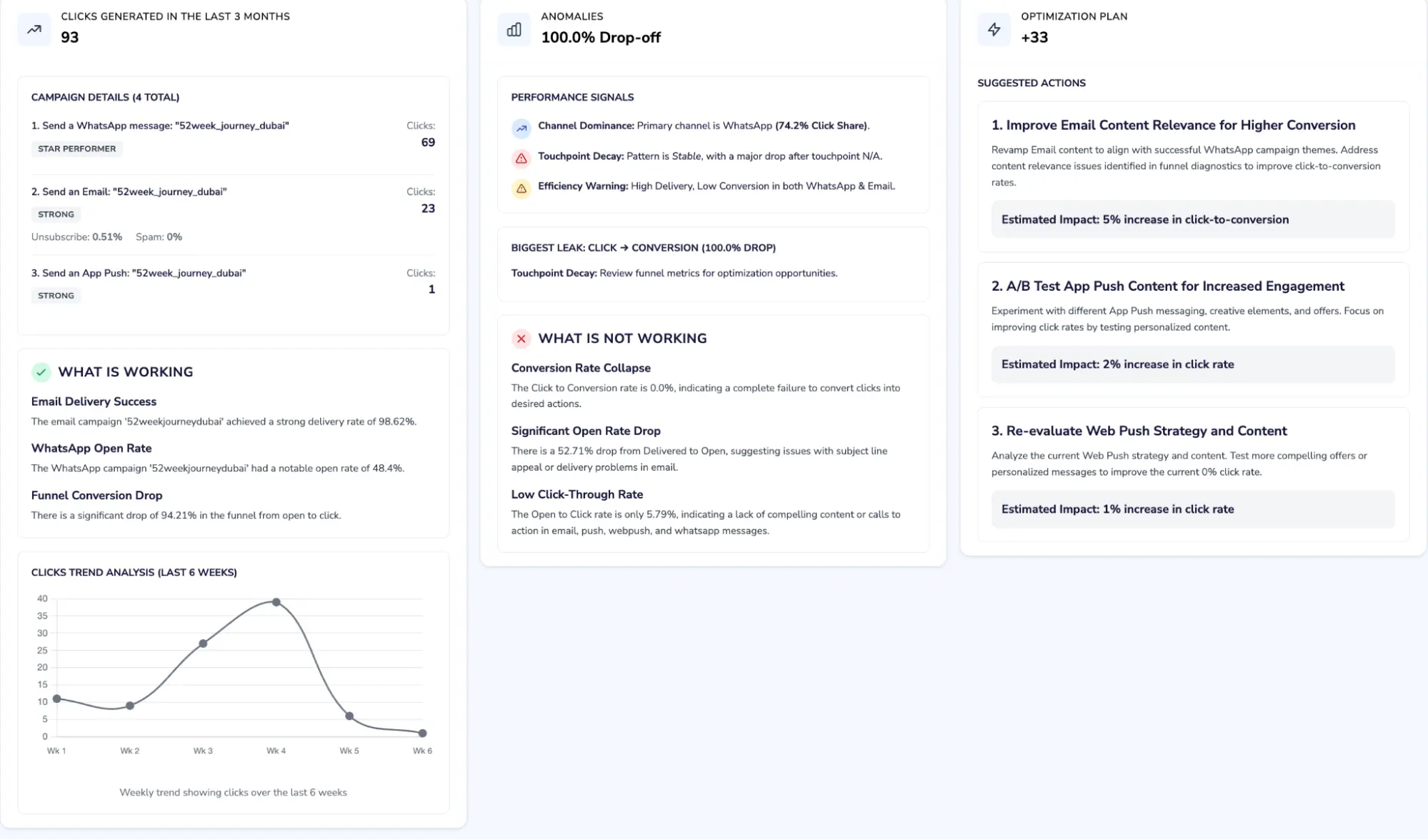
Insight’s Agent at Play
A fresh start is infinitely better than bringing your technical baggage along. It’s your chance to fix every “I wish we had built this differently” moment you’ve accumulated over the years.
The Step-by-Step Migration Roadmap
So, what does this actually look like in practice? How do we get you from an underperforming legacy platform to a fully optimized Netcore setup before the BFCM code freeze?
We have engineered our process to take the technical burden off your team. Here is the blueprint of a successful enterprise migration:
Phase 1: Discovery & Audit (Week 1)
We don’t guess; we document. Our Dedicated Migration Managers audit your entire current setup. We map out your active channels, third-party integrations, high-value segments, and revenue-critical automations. We identify the complex technical requirements early so there are no surprises in week six.
Phase 2: Account Foundation (Weeks 2–3)
This is where we build the house. We configure your Netcore account, setting up your domains, DNS records, and authentication protocols (SPF, DKIM, DMARC). We register your sender IDs for SMS and set up your WhatsApp Business API. Your engineering team will integrate our lightweight SDKs for mobile and web tracking. (For technical specifics, your dev team can review the Netcore Developer Documentation).
Phase 3: Data & Segmentation (Weeks 3–5)
Once the foundation is laid, we execute the data transfer. After cleaning your lists, we securely import your contacts, map your custom behavioral attributes, and most importantly, migrate your suppression lists. We then begin rebuilding your core segments natively, utilizing Netcore’s advanced bot-filtering technology to ensure your segments reflect true human engagement.
Phase 4: The Rebuild (Weeks 4–6)
Our team works alongside yours to recreate your highest-converting templates and omnichannel journeys. We start with the money-makers: welcome series, cart abandonment, and post-purchase flows. We embed Send Time Optimization and dynamic personalization into every step.
Phase 5: Parallel Running & Warm-Up (Weeks 5–8)
This is where the magic happens. We utilize a Parallel Running Strategy. You keep your legacy platform alive to handle your day-to-day revenue-generating broadcasts. Meanwhile, we safely and meticulously warm up your new Netcore dedicated IPs in the background by sending strictly to your most highly engaged users. Your customers experience zero disruption, and you don’t miss a dollar of revenue.
Phase 6: QA, Go-Live, and Decommission (Weeks 7–10)
QA is where migrations succeed or die. We test render across all email clients, verify deep links in push notifications, and manually trigger every journey branch. Once everything is validated and the warm-up is complete, we flip the switch. Netcore becomes your primary platform, and you safely decommission your old tool.
The Window Is Now
The countdown to Black Friday has already started, and the calendar dictates your next move. Every day you spend fighting with a limiting, frustrating marketing platform is a day you aren’t optimizing your strategy for the biggest sales event of the year.
A migration is not just a software change; it is a strategic upgrade to your entire revenue engine. By starting the process now, you guarantee that by the time October rolls around, you aren’t worried about technical debt or deliverability issues. You are simply ready to scale.Let’s talk about your timeline and see if a transition makes sense for your brand this year. Book a customized migration consultation with our enterprise team today and secure your Q4 success.